
How to Bind Jump to Mouse Scroll Down in CS2
Learn how to bind jump to mouse scroll down in CS2 for improved movement and bunny hopping. Follow our step-by-step guide to optimize your controls and gain a competitive edge.
Counter-Strike 2 (CS2) offers players a high degree of customization when it comes to controls. One popular configuration among experienced players is binding the jump action to the mouse scroll wheel. This setup can give you a slight edge in movement and bunny hopping. In this guide, we'll walk you through the process of binding jump to mouse scroll down in CS2.
Why Bind Jump to Mouse Scroll?
Before we dive into the how-to, let's briefly discuss why you might want to do this:
Faster input: Scrolling can be faster than pressing the spacebar, potentially giving you a slight speed advantage.
Easier bunny hopping: This technique becomes more manageable with a scroll wheel jump.
Muscle memory: Some players find it more natural to use the scroll wheel for jumping after practice.
Steps to Bind Jump to Mouse Scroll Down
Launch CS2: Make sure your game is up to date.
Open the Console:
If you haven't enabled the console yet, go to Game Settings > Game > Enable Developer Console (~).
Once enabled, press the tilde key (~) to open the console.
Enter the Bind Command: In the console, type the following command and press Enter:
bind mwheeldown +jumpThis command tells the game to execute the jump action (+jump) when you scroll down on your mouse wheel (mwheeldown).
Verify the Bind: To make sure the bind worked, you can type the following in the console:
bind mwheeldownIt should return "+jump" if the binding was successful.
Test in Game: Join a game or start an offline session with bots to test your new jump bind. Try scrolling down to jump and make sure it feels comfortable.
Optional: Bind Jump to Both Scroll Directions: If you want to maximize your scroll wheel for jumping, you can also bind jump to scrolling up:
bind mwheelup +jump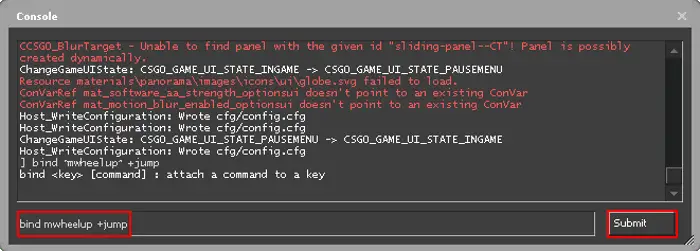

Tips for Using Scroll Wheel Jump
Practice, practice, practice! It may feel awkward at first, but with time it can become second nature.
Don't unbind jump from your spacebar. Keep both options available for different situations.
Experiment with your mouse settings. Some players prefer a looser scroll wheel for easier jumping.
Binding jump to your mouse scroll wheel can potentially improve your movement in CS2, especially for advanced techniques like bunny hopping. Remember that while it can offer advantages, it's not a magic solution – your overall skill and game sense are still the most important factors. Give it a try and see if it works for your playstyle!
Happy gaming, and may your frags be plentiful!


